
Xb Bargains
SP Soft s. r. o.Shopping
4.6242.00 Reviews
- Version
- 2.1.344
- Installs
- 1.00M
- Age Rating
- Teen
Screenshots
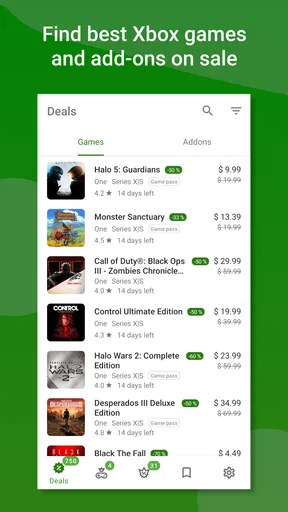
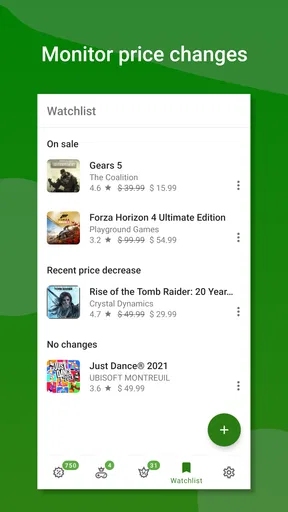
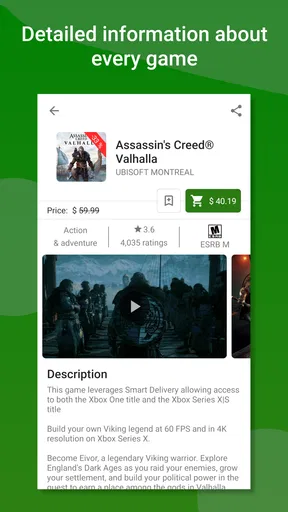
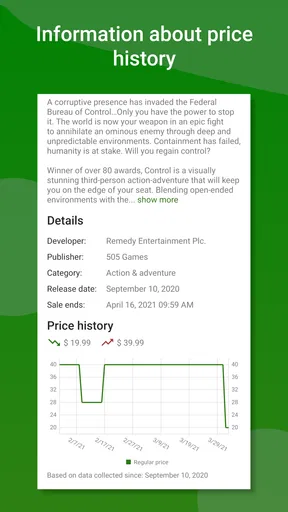
Our Review of Xb Bargains
 Analysis by Appyee
I tend to trust a shopping app more when its purpose is narrow and easy to understand. Xb Bargains is focused on finding lower prices for Xbox games, rather than trying to cover every kind of purchase. That focus makes it easier to judge whether it belongs in my routine: it is useful when I am watching a particular game’s price, but less compelling if I want a general shopping or deal-finding app.
What trust looks like for a deal tracker
Price alerts and wishlists can influence what I buy, so I prefer to know what I am choosing to follow and why a notification might arrive. Here, the central value is keeping an eye on Xbox game prices and collecting titles I may want later. I would treat it as a discovery and monitoring tool, not as a guarantee that every listed price is the lowest available or that a sale will last. Before buying, I still check the final price and terms at the retailer or marketplace where the purchase will happen.
The app is free to download, and it is published by SP Soft s. r. o. Its Teen age rating is worth noting for families deciding whether it is suitable on a shared device. The current version is 2.1.344, and it needs Android 7.0 or newer. The app has a 4.6 average from around 7,300 ratings, with over one million installs; that level of use is reassuring as a sign of interest, but it does not replace checking whether its current features suit your own shopping habits.
Choices, costs, and sensible checks
A wishlist is most useful when I make it selective. I would add games I genuinely expect to buy, then use price changes as a reason to revisit them rather than as pressure to purchase immediately. A discount only saves money if the game was already on my list; otherwise, it can simply turn an unplanned purchase into a tempting one. If a price alert arrives at an inconvenient time, I can wait until I am ready to compare options instead of treating the notification as a deadline.
The app includes in-app purchases priced from $1.49 to $2.99 per item, so I would check the purchase screen carefully before confirming anything. The free download does not mean every optional item is free. I would also review the permissions and account choices shown on my own device during setup, and avoid connecting an account or enabling a permission unless I understand why I want it. Those checks are practical safeguards, not a claim about what information the app collects or how it handles it.
That distinction matters with shopping tools: an alert is a prompt to investigate, not proof of a bargain, and a saved item is not a commitment to buy. I would compare the displayed offer with the price shown at checkout, confirm that the game is the right edition and compatible with my Xbox setup, and take note of any regional restrictions or purchase conditions shown by the seller. A few seconds of checking can prevent a discount from becoming a poor fit.
Using it without letting deals make the decisions
For me, the best way to use a game-price tracker is to decide what I want before browsing offers. That keeps the wishlist useful and makes alerts easier to act on selectively. It also leaves room to ignore a drop if I have other priorities, or if the price is still above what I am comfortable paying.
A practical routine for Xbox game shoppers
Imagine I am interested in a particular Xbox game but do not need it right away. I add it to my wishlist, then carry on with my day rather than repeatedly searching retailer pages. If a price alert arrives, I open the offer when convenient, check that it applies to the edition and region I want, and compare the final checkout cost with other available options. If the deal is good but I am not ready to play, I leave it alone; waiting is still a useful outcome when the purchase is optional.
That routine is a better fit for planned purchases than for impulse browsing. It can be especially handy around a backlog: I can keep a short list of games I will genuinely play, then decide whether a price change justifies buying one before I move on to another. I would avoid filling the wishlist with every interesting title, because a large list makes it harder to tell which alert deserves attention.
There is also a useful distinction between tracking and shopping. A tracker helps me notice a change; a retailer or console storefront is where I verify the current offer and complete the transaction. Keeping those steps separate helps avoid assuming that an alert reflects the final price, stock, or conditions. For a higher-cost purchase, I would take the extra moment to check the checkout page rather than relying on a notification alone.
Where it fits among shopping alternatives
Compared with manually checking several storefronts, a dedicated Xbox game tracker can save effort when I have a few specific titles in mind. General deal forums and broader shopping apps may cover more products and sometimes surface user-posted tips, but they also bring more unrelated offers to sort through. A console’s own store is the better place to confirm the current listing and buy; a tracker is useful earlier, when I am deciding whether to pay attention to a price movement at all.
That trade-off is important. If I shop across many platforms, want alerts for hardware and accessories as well as games, or prefer a single app for all household purchases, a broader price-comparison service may be more convenient. If my main concern is a particular Xbox title, a focused tracker is easier to keep relevant. I would choose based on the shopping problem I actually have, not simply on the number of features an app claims to offer.
It is also worth setting expectations around timing. Price monitoring is most valuable when I can wait; it is less useful if I need a game immediately or have already decided to buy at the current price. Even when an alert helps me spot a drop, the choice still depends on the edition, the seller’s terms, and whether the game is something I want now. The app can support that decision, but it cannot make it for me.
Who will get the most from it
I would recommend this kind of focused tool to Xbox players who keep a mental list of games they want, are comfortable waiting for a better price, and do not mind checking an offer before purchasing. It is also a sensible option for someone who tends to forget titles they meant to revisit: a wishlist gives those intentions a place to live, rather than relying on browser tabs or memory.
I would skip it if I rarely buy Xbox games, prefer to purchase immediately, or want one place to monitor discounts across unrelated product categories. It may also be a poor match if notifications distract me or if I do not want optional in-app purchases. In that case, occasional manual checks of the storefronts I already use are likely enough, even if they take more effort.
One small but useful habit is to keep the list short and revisit it before acting on an alert. Removing games I no longer want makes future notifications more meaningful and reduces the temptation to treat every price change as an opportunity. Another is to compare the final amount rather than the headline discount: the number that matters is what I would actually pay for the correct version of the game.
Getting Started with Xb Bargains
Diving into Xb Bargains is like stepping into a treasure trove of discounts. The app's interface is super user-friendly, which is great if you're like me and want to get straight to the deals without a hassle. Once you download and open the app, you're greeted with a clean and intuitive dashboard. No overwhelming ads or unnecessary clutter, just pure bargain-hunting bliss.
Setting up your account is a breeze. You can sign up using your email or connect via social media for a quick start. I appreciated how the app allows you to customize your preferences, letting you choose categories that interest you the most, from electronics to fashion and everything in between.
Features That Shine
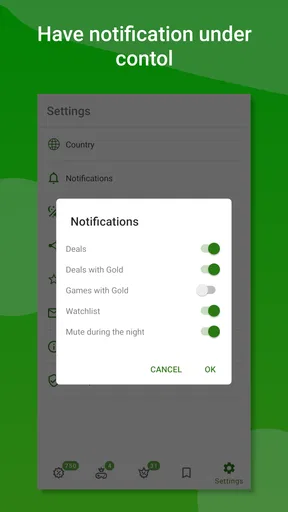
One of the standout features of Xb Bargains is its real-time deal alerts. Imagine you're out and about, and suddenly your phone buzzes with a notification about a flash sale on that gadget you've been eyeing. It’s like having a personal shopping assistant right in your pocket.
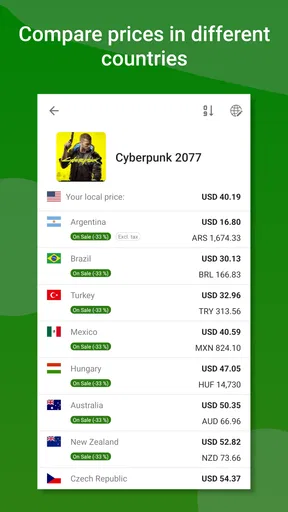
The app also boasts an extensive database of deals from a variety of retailers. What I found particularly impressive is the price comparison tool. It not only shows you where to find the best price but also tracks price history, so you know if you're getting a genuine bargain.
Another cool feature is the community aspect. You can join groups or forums within the app to exchange tips and tricks with fellow bargain hunters. It's a fantastic way to discover hidden gems that you might otherwise miss.
My Experience
Using Xb Bargains, I managed to snag a few items at prices that seemed almost too good to be true. The app's alert system worked like a charm, notifying me of a 50% off sale on a pair of headphones I’d been wanting. Within minutes, I had them in my cart, purchased, and on their way to my doorstep.
I also loved the ability to save deals for later. Sometimes, you're not ready to make a purchase on the spot, and having a "wishlist" feature helps keep track of potential buys without the fear of forgetting them.
Final Thoughts
Overall, Xb Bargains is a must-have for anyone who loves shopping smart. It's packed with features that make finding and securing deals a seamless experience. Whether you're a seasoned bargain hunter or new to the game, this app has something to offer.
If you're tired of missing out on great deals or just want to make your shopping experience more efficient, give Xb Bargains a try. Trust me, your wallet will thank you!
Verdict
Strengths of Xb Bargains
- User-friendly interface for easy navigation.
- Wide range of discounts and offers.
- Regular updates with new deals.
- Personalized recommendations based on preferences.
- Secure payment options available.
Limitations of Xb Bargains
- Limited availability in some regions.
- Occasional lag during peak usage.
- Some deals may expire quickly.
- Requires account creation to access features.
- Advertisements can be intrusive at times.
Similar Picks in This Category
View All
SHEIN-Shopping Online
Roadget Business PTE. LTD.4.8

Amazon Shopping
Amazon Mobile LLC4.4


Mercado Libre: Compras online
Mercado Libre4.8

Wish: Shop and Save
Wish US Holdings LLC4.7

Alibaba.com - B2B marketplace
Alibaba Mobile4.4
Frequently Asked Questions
What is Xb Bargains and how does it work?
Xb Bargains is a dynamic app designed to help users find the best deals and discounts across various online platforms. It aggregates offers from multiple retailers, providing a seamless browsing experience. Users can search by category, compare prices, and even set alerts for specific products to be notified when prices drop.
Is Xb Bargains free to use, or are there any hidden costs?
Xb Bargains is free to download and use. There are no hidden fees involved. However, some premium features, like advanced filtering or ad-free browsing, might require in-app purchases. The app aims to save you money by providing access to deals without any upfront cost.
Can I trust the deals and discounts listed on Xb Bargains?
Xb Bargains strives to ensure all listed deals and discounts are legitimate and updated regularly. The app partners with reputable retailers, but it's always wise to double-check the deal directly on the retailer's website to ensure accuracy and availability before making a purchase.
How does Xb Bargains ensure the privacy and security of my data?
Xb Bargains is committed to protecting user privacy. The app collects minimal personal data required for account creation and preferences. It employs encryption protocols to safeguard your information. Users can also review the app’s privacy policy to understand how their data is used and stored.
What devices are compatible with Xb Bargains?
Xb Bargains is compatible with both Android and iOS devices. It supports a wide range of smartphones and tablets, ensuring a smooth user experience across platforms. To get the best performance, make sure your device is running the latest operating system version and meets the app’s technical requirements.
